
Concept: Tools for Understanding and Deliberation
The USHIN framework provides tools and methods to structure communication, bridge online and offline dialogue, and foster deep mutual understanding around complex issues.
Core Philosophy: Understand & Deliberate
1. Understand
- Focus on One Point at a Time: Minimize distraction by examining primary concepts individually.
- Support the Main Idea: Map out context by examining supporting elements:
- Diverse Perspectives: Account for different viewpoints and lived experiences.
- Nuanced Meanings: Differentiate between subjective feelings, objective facts, and underlying needs.
- Systemic Impact: Trace broader influences and downstream effects.
2. Deliberate
Transparently share ranking models and criteria with peers.
Organize Perspectives: Collate input from disparate sources into a unified structure.
User-Controlled Evaluation: Adjust criteria to view issues through multiple analytical lenses:
Establish custom, reasoned criteria to evaluate and rank merit.
Set personal weights and measures without relying on platform algorithms.
Purpose of the USHIN Method
- Structured Dialogue: Organize complex communication across diverse perspectives.
- Direct Representation: Empower individuals to gather and speak directly on shared interests.
- Focus on Essentials: Keep discussions grounded in vetted facts, real human needs, and emotional truth.
- Bridge Communication Media: Connect offline face-to-face facilitation with digital tools.
- Decouple Merit from Popularity: Allow users to evaluate information on substance rather than viral metrics.
- Actionable Outcomes: Prepare participants for informed decision-making and clear accountability.
The USHIN Shapes
Ushin uses 8 distinct shapes to represent 8 fundamental kinds of meaning.
Hover the shapes to see what they typically represent. Download the widget for your site.
Our curated Lists of Feelings, Needs, and Thoughts are designed to help you find the precise words for your internal experiences. Other dimensions—such as Facts, Merits, People, Actions, and Topics—are tailored directly to your specific situation.
Here is a widget including the lists, and here are just the lists of feelings, needs and thoughts.
Purpose of shapes
Whether online or offline, physical and visual shapes provide a practical structure for navigating personal, relational, family, organizational, and social issues.
- Simplify & Clarify: Easily categorize complex communications into core kinds of meaning.
- Get Straight to the Point: Focus discussions on essential points without getting bogged down in noise.
- Analyze Logically: Evaluate information step-by-step with enhanced clarity and reduced bias.
- Hear and Be Heard: Foster genuine mutual understanding through shared, transparent communication structures.
See Projects to explore various online interfaces, card sets, and offline experiments designed to help people express a full spectrum of ideas.
Offline “Ushering” tools
Tactile tools—such as physical cards, charms, and cross-hatch forms—help participants stay focused and articulate a full spectrum of ideas during live, face-to-face dialogue.
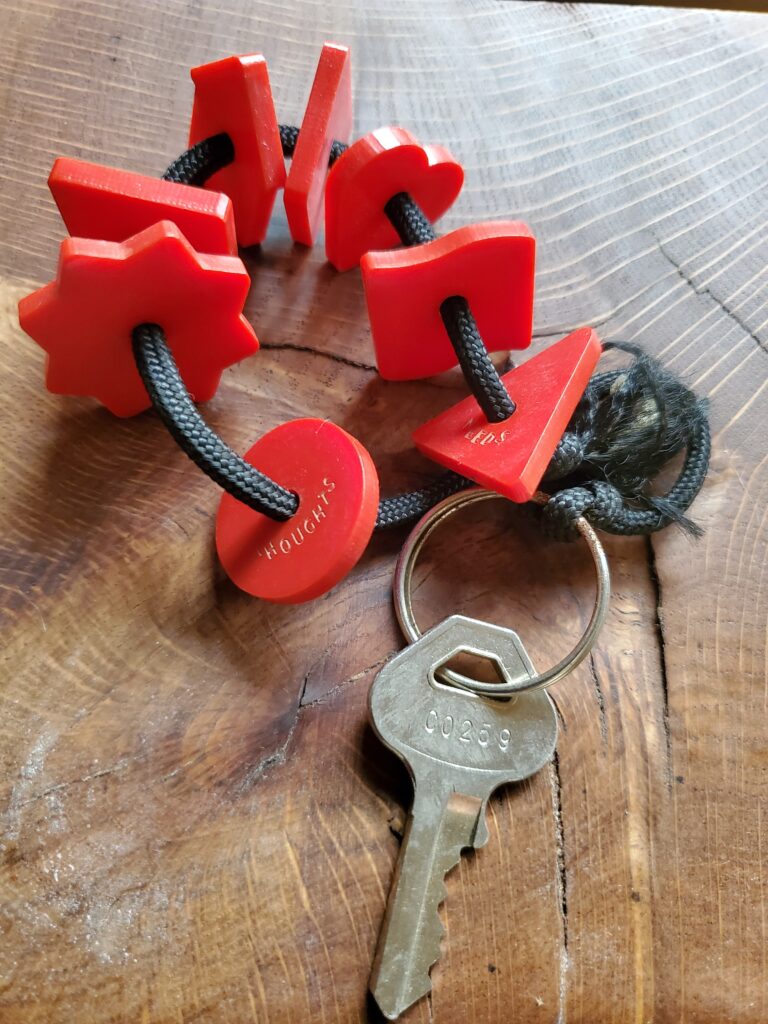
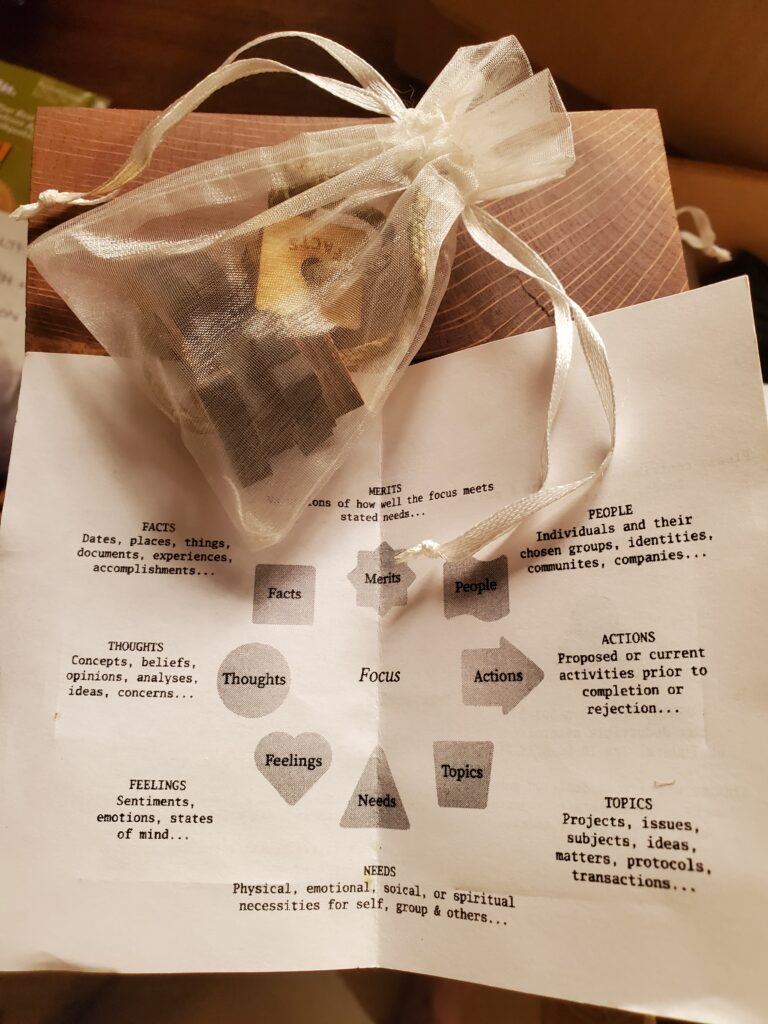


Examples of Offline “Ushering”
- Personal Decision-Making: A recent graduate deliberates where to move after college. She lists potential locations (Topics) and evaluates top priorities against her Feelings and Needs. By incorporating input regarding key People in her life, she thoroughly considers her options and narrows her choices to communities aligned with her personal purpose and career goals.
- Interpersonal Conflict Resolution: Two friends sit on a park bench. When one complains that an acquaintance is “lying,” the other introduces a deck of 8 USHIN cards. The friend plays:
- Feelings: Expressing her initial outrage.
- Facts: Describing the event while acknowledging differing memories.
- People: Considering the event from the other person’s perspective.
- Topics: Identifying outside influences that might explain the disagreement.
- Thoughts: Planning an apology for losing her temper and deciding to ask what was going on for the other person.
- Group Facilitation: Facilitators organize group discussions using shape cards to quickly visually tally participants’ input type (e.g., asking for a “show of shapes”) and moderate popcorn-style comments based on specific kinds of meaning.
- Research & Content Strategy: A researcher uses shapes to categorize empirical Facts, analytical Thoughts, People to cite or interview, overarching Topics, and procedural Actions.
- Civic Meetings: A city council member structures a public town hall using a tabletop USHIN layout. The central Topic sits in the middle, surrounded by shape-designated input boxes where attendees submit categorized notes for guided discussion.
- Digital Civic Workflows: Local groups utilize web applications featuring USHIN tags, custom merit calculations, and peer-based filters to assist council members in initiating public deliberations.
- Multi-Disciplinary Healthcare: In early modeling of an osteoporosis case, diverse healthcare practitioners contributed input across a spectrum of influences—such as diet, exercise, hormones, and prescriptions—mapping diverse treatment perspectives onto shared shapes.
Online Deliberation
USHIN shapes offer an intuitive framework to find, compare, evaluate, and share perspectives online. Tagging input with USHIN shapes helps authors clarify their intended meaning while enabling readers to quickly digest main points and supporting arguments.
Users can host open deliberations for others to browse, analyze, and contribute to. Exploration is completely open-ended and non-linear: one user might start by filtering for pure facts, transition into analytical thoughts, assess peer feelings about those analyses, and evaluate proposed actions based on met needs. Users and groups retain full autonomy to set their own qualifiers, priorities, and custom filters.
- Envisioned Tools: Visit our Projects page for a high-level overview of planned software applications.
- Developer Resources: For technical specifications and repository links, visit our Software site for open-source documentation.
- Deliberation Workflows: See our Examples page to explore live demonstrations, including UI development discussions (
u4u), collaborative song analysis, and article annotations on therapeutic compounds.
Software Development & Prototypes
We are actively seeking passionate developers to join our small team in bringing open deliberative tools to the web.
- Live Prototype (
ushin.org): Test active peer-to-peer (P2P) deliberation models using USHIN shapes. - Minimalist Semantic Screen (
u4u): Demonstrates the core semantic interface in its simplest form. - Archive & Wishlist (
dev.ushin.net): Explore past experimental builds, conceptual models, and development goals.
Key Application Features
- Semantic Screen (Semscreen): Provides immediate contextual focus from a single perspective.
- Central Main Point: Displays the core thesis surrounded by structured supporting points.
- Streamlined Tagging: Require at least one shape tag per point prior to publishing.
- Findings List & Filtering: Sort content seamlessly by keyword, shape type, or date.
- Comparative Views: Juxtapose diverse factors and contrasting viewpoints side-by-side.
- Deliberative Connections: Link two or more points into logical groups, labeling the connecting edge as a distinct publishable point.
- Optional Peer Graph: Visualize relationship maps across participating users.
- Custom Filters: Apply user-defined and contextual rules to curate data displays without central algorithmic curation.
History of the USHIN Concept
The visionaries of the USHIN system first assembled in the early 1990s to solve critical challenges in healthcare delivery and protect individual bodily autonomy through open choices.
The nascent internet provided an ideal landscape to plant seeds for a decentralized, shared information network. The team originally proposed a US Health Information Network where individuals (or their representatives) managed private health journals, tracking specific symptoms, treatments, and outcomes. By stripping data of personal identifiers, users could anonymously view effective treatments, while collective deliberations clarified which therapies benefited specific demographic groups. Healthcare practitioners similarly gained a broader perspective on treatment options and connected with patients seeking their specific methods.
Basic USHIN Deliberation Steps
- Define the Topic: State the primary topic of deliberation along with core subpoints.
- Sort by Shape: Categorize every input point according to its corresponding USHIN shape.
- Assign Merit: Evaluate and assign merit to points based on your own defined criteria for each shape.
- Refine Subpoints: Add or subtract supporting subpoints according to those merit criteria.
- Adjust Understanding: Incorporate new supporting evidence to refine overall judgment and perspective.
- Collaborate & Track: Brainstorm, prioritize, and re-evaluate points as a group while tracking changes in real time.
Key Features of a Mature USHIN System
- Custom Filtering & Sharing: Easily create, edit, and share customized weights, measures, and content filters for specific topics.
- User-Driven Display Controls: Control exactly what appears on your screen based on personal priorities rather than external platform algorithms.
- Dynamic Visualization: Display findings in novel visual formats, allowing users to expand or focus on specific regions of related input.
Core Deliberation Methodology
- Inclusivity & Accessibility: Foster broad population access and meaningful inclusion for all interested participants.
- Topic-Specific Metrics: Tailor weights and measures to fit the specific nuances of each topic under discussion.
- Popularity-Independent Merit: Evaluate input on substance, allowing merit calculations to function with or without factoring in popular votes.
- Disambiguation & Translation: Clear up ambiguous terms and translate concepts across diverse perspectives.
- Transparent Calculations: Keep merit formulas fully customizable and open for inspection by individuals and groups.
- Integrated & Decentralized Architecture: Seamlessly connect offline card systems with digital tools. Empower communities to customize their own:
- Icons and visual styling
- Unique terminologies and qualifiers
- Priority rankings and custom filters
- Peer promotion and blocking preferences
Strategic Challenges
- Community Reach: Connect with developers, advocates, and financial supporters to scale the USHIN concept.
- Platform Integration: Build an interoperable deliberation framework capable of linking disparate software platforms.
- Timely Execution: Rapidly deploy functional tools while open internet frontiers remain accessible.
- Vision Communication: Clearly articulate the unique, multi-dimensional vision of shape-based deliberation to a wide audience.
How It Works: From Face-to-Face to Online
Face-to-Face Tools
- Tactile USHIN charms, cards, and physical shapes encourage participants to express themselves clearly, completely, and concisely during in-person dialogues.
- Dedicated face-to-face software is currently in early design to bridge offline discussions across different groups.
Online Features
- Meaning-Based Aggregation: Group information dynamically by its category of meaning (e.g., viewing all empirical facts together).
- Contextual Focus: View central points in context, with related surrounding shapes and inputs visible.
- Multi-Angle Views: Re-rank, compare, and analyze complex logical threads—such as viewing thoughts about a peer’s feeling linked to a proposed action.
- Algorithmic Neutrality: By default, USHIN minimizes viral popularity bias by prioritizing content according to transparent, user-selected filters, shapes, keywords, and trusted peer network rankings.
Tagging & Metadata Interoperability
Online USHIN shapes function as metadata tags to distinguish core categories of meaning. Beyond the core 8 tags, users can apply custom tags for specific domain needs. Standardized tags maximize cross-platform discovery, while custom tags give users freedom within their own deliberations.
100% Platform-Safe Metadata Tag Syntax
Standardized inline syntax ensures shape tags render correctly without being misread by external web platforms:
Merits | u*text* |
|
|
Facts | u[text] |
|
|
Thoughts | u(text) |
|
|
Topics | utext/ |
|
|
Feelings | u:text: |
|
|
Needs | u^text^ |
|
|
Actions | u>text> |
|
|
People | u~text~ |
|
|
Won’t tagging slow people down?
Yes—and that is an intentional feature of deliberative design. Tagging prompts participants to reflect before responding, articulate precise meanings, and remain open to alternative viewpoints. The Semantic Screen makes tagging fast and seamless through designated screen regions and single-tap categorization.
Once people receive tagged information, the main point is front and center along with what’s most important about it. Complex messages are laid out for full understanding as users:
- Find input from peers they’ve chosen.
- Share original input and replies to what others have published.
- Set and view merit values according to their own qualifiers and rankings.
- See how others ranked points using their own vs. others’ merit settings.
- Expand peer groups to include peers’ peers.
- Retrieve more results by hopping out from primary peers to secondary peer inputs.
- Connect with others around shared interests and varied perspectives.
- Determine courses of action with high merit toward meeting urgent needs.
Discovery & Search
How to Find Information
- Keyword Search
- USHIN Tags for specific kinds of meaning within text snippets (using the user’s choice of custom tags, rankings, qualifiers, or peer tags)
- General Search Filters
- Search-Specific Filters
First Introduction to Online USHIN Discussions
- Peer Networks: Discover information shared across peer networks by word-of-mouth or social networking.
- Initial Access: Users typically receive their first link via email, social media, thumb drives, devices, or online file-sharing systems.
- Distributed Discovery: Discovery itself remains an active topic of deliberation (utilizing Distributed Hash Tables [DHT] and peer group connections).
System Flexibility & Use Cases
Any iteration of USHIN adapts to its users’ needs and creativity:
Solo “Ushering”: Individuals use the shapes for personal reflection to uncover insights into personal behavior, relationship dynamics, underlying causes of feelings, trigger analyses, and actionable self-care strategies.
Counseling Applications: A marriage counselor downloads and embeds the USHIN widget on their website as a recommended tool. Clients select specific topics to build mutual understanding.
Family Deliberations: A family can publish grandmother’s heirlooms to an extended family circle without hierarchy, or siblings can deliberate specific items before opening topics to a larger circle.
Adaptable Facilitation: Group counselors can pass out a deck of 8 blank, unlabelled USHIN shape cards. Gazing at the raw shapes prompts participants to express thoughts and ideas in entirely new ways.
Qualifying and Quantifying Merit
- Merit Scoring (Early Design): Users and groups rank the merit of any point according to personal and collaborative filters.
- Default Structure: Uses 8 core shapes (7 currently active in prototypes on
ushin.org).- Users rank published supporting points (e.g., scale of 0 to 5 per shape).
- The merit of a main point is calculated using weighted averages of qualities within shapes, which are themselves ranked by the user, selected peers, and publishers.
- Peer networks self-organize to co-create custom filters, taxonomies, topics, tags, connection labels, and qualifiers.
Core Functions: Offline vs. Online
Offline Functions
Physical shapes provide a structure for resolving personal, relational, family, organizational, and social issues:
- Simplify, clarify, and emphasize basic meanings.
- Get straight to the point.
- Analyze information logically.
- Hear and be heard through shared meanings.
- Clarify points toward mutual understanding.
Online Functions
- Find Points: View facts—including contradictory facts—alongside supporting evidence. Expand related topics to explore alternate perspectives and inform actionable decisions.
- Filter Points: Filter shape types (e.g., toggling feelings on/off), terms, or peers to judge findings on their own merits.
- Compare Points: Juxtapose input by keywords or compare pure facts side-by-side in custom tables, charts, or ranked lists.
- Create Points: Establish a central focus, enter text into screen regions, tag text with shapes, edit subpoints and main points, and cite supporting evidence.
- Evaluate Points: Add or subtract merit based on custom filters, review logic, evaluate argument sincerity in context, and represent chosen perspectives.
- Update: Update saved input continuously as new points emerge.
Detailed Interface Features
- Information Retrieval: Search using keywords, required USHIN shape tags, custom group tags, general filters, or peer network subgroups.
- Grok Meaning:
- Prominently display central main points.
- Use shape tags to immediately convey intended meaning.
- Skim supporting points organized by screen region.
- Flip through peers’ similar shape tags related to the main point.
- Separate facts from feelings and recommended actions.
- View messages in context with surrounding points, personal search history, or packaged author history.
- Rank Points by Merit:
- Compare similar kinds of messages (e.g., comparing facts to facts, feelings to feelings).
- Set preferences using custom, default, or peer filters.
- Adjust filters on the go and compare how peers rank points.
- Toggle between peer networks, directly known peers, or extended peer networks.
- Share Responses:
- Select any main point or subpoint to attach a reply.
- Type directly into semantic screen regions to tag supporting points.
- Select and publish main points packaged with attachments, filters, and peer groups.
- Maintain visual context with prior semantic screens displayed on the rim or header.
- Export custom filter sets and published input for others.
- Connect main points with visual lines (edges) to display structural context.
- Deliberate: Anyone can launch a deliberation by publishing original input and sharing it across peer networks, or transition digital discussions into face-to-face community meetings.
The Inspiration Behind the 8 Shapes
Universal Shared Information (USHIN) builds upon Nonviolent Communication (NVC), a framework designed to clarify human motivations and foster empathetic connection. While simple conversations do not require heavy structural tools, USHIN shapes excel when dialogue is difficult, polarized, or high-stakes.
The 4 NVC Foundations
- Facts (Observations): What we witness with our senses (personal experiences, journal articles). Owning observations helps clarify assumptions and appreciate diverse experiences.
- Feelings: Core emotional states (mad, sad, glad, scared) and their nuances.
- Needs: Essential physical, emotional, mental, and spiritual conditions for human well-being.
- Actions (Requests): Specific, actionable steps requested of ourselves or others.
Lists of feelings and needs are handy for finding the words to describe internal, personal observations. Facts and requests are specific to your situation.
The 4 USHIN Extensions
- Thoughts: Attitudes, judgments, recommendations, and methods of reasoning.
- People: Individuals, groups, communities, nationalities, and stakeholders.
- Topics: Related subjects to consider and honor separately.
- Merit: Customizable systems for ranking, scoring, and filtering input.
A list of thoughts is handy for finding the words to describe your reasoning and judgement. People, Merits and Topics are specific to your situation.